ANAHEIM, CA / ACCESS Newswire / July 6, 2026 / A home workshop laser engraver is one of the more accessible paths into product-based income available right now. The equipment is affordable. The materials are inexpensive. And the path from first machine to first sale is measured in weeks for most people who approach it with a clear product focus.
This guide covers the practical setup: choosing the right machine for a home environment, building a functional workspace, and moving from learning the tool to generating revenue from it. OMTech offers CO2 and fiber laser systems suited to home workshop production at a range of price points.
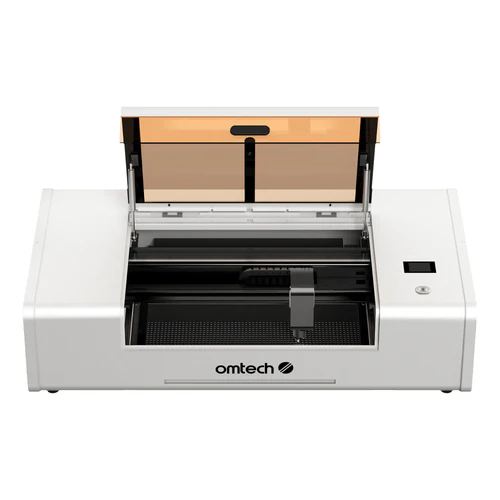
Choosing the Right Machine for Home Workshop Use
CO2 for Non-Metal Products
For home workshops focused on personalized products, gifts, and small batch non-metal production, CO2 laser engraver machines are the correct starting point. CO2 handles wood, acrylic, leather, glass, fabric, and slate. Those six materials cover the vast majority of sellable home workshop products.
What to look for in a home workshop CO2 machine:
Enclosed design: Contains fumes for extraction, safer in shared home environments, allows unattended short-run operation
Power: 60W to 80W minimum for production use. 40W limits material thickness and slows batch production
Work area: At least 16 by 24 inches for standard product categories. 20 by 28 inches for cutting boards and signs
LightBurn compatibility: Professional software support for batch variable text and production workflows
Autofocus: Saves setup time across varied material thicknesses. Pays off quickly in home production use
Fiber for Metal Work
Home workshop knife makers, jewellers, and metal fabricators need fiber laser for permanent metal marking
20W to 30W compact galvo fiber systems cover most home workshop metal marking needs
No water chiller required on most compact fiber systems. Simpler setup than CO2
Marks steel, aluminum, brass, and titanium permanently without consumables
Setting Up the Workspace
Ventilation: Non-Negotiable
Laser engraving produces smoke and fumes from burned material. In a home environment, this is the most critical setup element.
4-inch inline exhaust fan rated for at least 150 CFM connected to the machine exhaust port
Duct to the outside through a wall port or window insert. Outside venting is the most effective solution
For workshops without outdoor venting, a standalone air filtration unit with HEPA and activated carbon
Running without extraction creates health risks from cumulative fume exposure and makes the workspace unpleasant within minutes
Electrical Setup
Most CO2 machines in the 60W to 80W range operate on standard 110V and draw 5 to 8 amps
Dedicated 15-amp circuit prevents shared breaker trips when other workshop equipment runs
Check circuit capacity before machine delivery if your workshop shares circuits with high-draw equipment
Workspace Layout
Stable, level surface - vibration during engraving produces visible quality degradation
Working height of 34 to 36 inches for comfortable material loading and job monitoring
Clear access on front, side for exhaust connection, and rear for chiller if required
Computer within cable reach or wireless network range depending on machine connectivity
Essential Accessories for Home Production
Rotary attachment: Required for tumblers, wine glasses, and any cylindrical work. Tumblers are one of the highest-demand home workshop products. Buy this early
Honeycomb work table: Supports flat material and allows smoke to escape beneath cut zones. Reduces backburn marks on cut material undersides
Air assist pump: Blows air across the cutting zone clearing smoke and improving cut edge quality. Included on some machines, available as upgrade on others
Water chiller for CO2: Built-in pump systems work for light home use. Standalone chiller recommended for warm climates or sessions longer than two hours
Camera module: Positions designs on irregular or pre-cut material. Eliminates manual alignment time for repeated jobs on the same template
Learning the Software
LightBurn is the standard for home workshop CO2 and fiber laser machines:
Imports SVG, DXF, AI, and other standard vector formats from design programs
Material settings library stores tested power and speed parameters for quick recall on repeat materials
Variable text feature enables batch personalization - a sequence of names across a production run without manual file changes
Camera alignment system for positioning designs on pre-cut or irregular material
Most home operators feel comfortable with basic workflows within the first week
The LightBurn forum community is active and searchable. Most common questions and material parameters have been documented by other users.
From First Test to First Sale
The path from first test engraving to first paid order typically runs two to four weeks:
Week 1: Learn the machine, run test cuts and engravings on scrap material, develop settings for primary materials
Week 2: Produce first product samples. Photograph them. Identify what looks good and what needs adjustment
Week 3: List products on Etsy or share with local contacts. Take first orders
Week 4 onward: Refine based on what sells. Focus production on the two or three products generating orders
Most successful home workshop sellers start narrow. Two or three products executed well outperform a broad catalog of products executed inconsistently.
Products That Generate Revenue From Home Workshops
Personalized cutting boards: $10 to $14 blank sells personalized for $50 to $80. Year-round demand with holiday peaks
Engraved tumblers: $6 to $12 blank sells personalized for $25 to $45. Requires rotary attachment. High Etsy search volume
Custom wooden signs: $5 to $8 MDF or plywood sells as finished sign for $35 to $75. Address plaques, family name pieces, welcome signs
Laser-cut ornaments: Strong seasonal demand. Wood or acrylic blanks under $3 sell as personalized ornaments for $15 to $30
Slate coasters: Slate tiles at $2 to $4 each sell as personalized coaster sets for $25 to $45 for four
Corporate gifts: Higher per-unit value. Branded wood or acrylic pieces for local businesses. Repeat orders once a relationship is established
Realistic Revenue Expectations
Month 1 to 2: Learning phase. First test sales. Identifying which products generate real interest
Month 3 to 6: $200 to $800 per month for sellers listing consistently and responding to orders promptly
Month 6 to 12: $500 to $1,500 per month for sellers who have identified their two or three best products and focused on them
Year two and beyond: Sellers who build repeat customer relationships and corporate gifting accounts regularly exceed $2,000 per month
The machine pays for itself through product sales. Most home workshop operators reach equipment payback within 6 to 18 months depending on product mix, pricing, and time invested.
Contact Details:
SOURCE: Omtech
View the original press release on ACCESS Newswire